
Your share, everywhere
Monthly spend, categories and upcoming charges all count what is yours. What you fronted for the others is shown on its own line, never folded in.
Split & Threads · Watch
The family plan you split three ways, the flat's internet, the streaming service a friend covers. Split the record, nudge whoever's share is due, see who has paid, and keep the back-and-forth on the record itself. Renew Reminder keeps track; it never moves the money.
FreeOn every plan.
Everyone agrees to split the family plan. Then a few months later nobody remembers who paid in March, the reminder text feels awkward, and the total on your own budget includes money that isn't yours. Split & threads keeps the shares, the nudges and the receipts on the record they belong to.
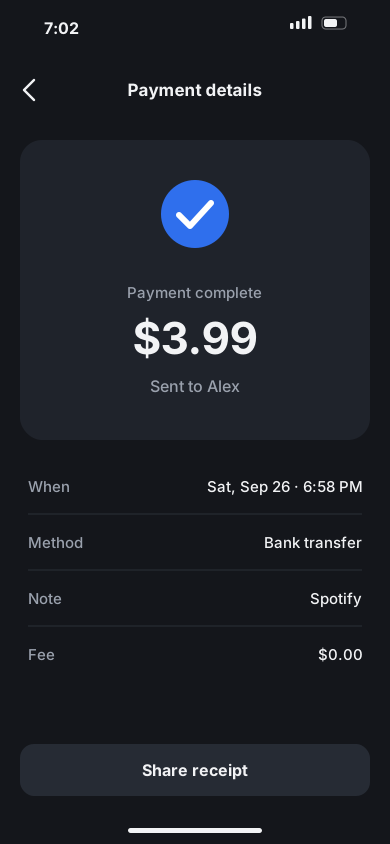
Split a subscription or a bill with the people who share it and each share is worked out for you — whoever pays absorbs the rounding, so Spotify at $11.99 three ways is $4.01 for you and $3.99 each for Sam and Jordan. The record still shows the real charge; the pill under it shows your share, and that is what every total counts.
The People card lists everyone on the split with one quiet word or one thing to tap. Invited until they join, then Sharing; once the thread is going, Nudge when their share is due, Nudged today after you have, and Settled when they have paid this cycle. Someone with no email or number gets “Add email or number” instead.
When someone's share is due, tap Nudge beside their name and pick the line — their share is due, or did they pay yet — with the amount filled in. Add a short note if you like. They get it as a notification; you get “Nudged today” so you don't send it twice.
The people you share with get their own copy of the record, showing their share and who pays. When Sam has sent the money, Sam taps “I've paid my share”, chooses the screenshot from their bank app — it uploads right there, with its progress — adds a note if they want to, and taps Done. Alex sees it in the thread, and Sam's copy reads Settled for this cycle.
On your side, a notification says Sam paid their share and attached a receipt, with Sam's note under it. The screenshot lands in the thread as a thumbnail you can open full screen, and Sam reads Settled this cycle. Settled is what people report, not something the app checks with a bank.
Jordan paid by bank transfer and sent the screenshot in your group chat. On the Activity page, tap Mark paid beside Jordan, choose the screenshot and tap Done once it has uploaded. The thread says you marked Jordan as paid and attached a receipt, and Jordan sees the same line.
Every split record keeps its own dated history: who joined, who was nudged, who paid, and short notes like “Sent mine by bank transfer”. Lines sit under Today, Yesterday or the date, each with its exact time. Press a line to react with Got it or Thanks, reply with a note, or — if you have to — report it or block the person.
There is no payment inside the app — no wallet, no transfer, no fee. Shares are settled however you already settle up, and the record shows what people say they have paid.
Monthly spend, categories and upcoming charges all count what is yours. What you fronted for the others is shown on its own line, never folded in.
Everyone on a split can talk it over in the record's own chat, and the dated history of joins, nudges and payments stays beside it. Messages can be up to 1,000 characters, and you can send up to 60 a minute.
Anything in a thread can be reported — it is hidden for everyone after enough reports, and staff review it. Block someone and they can no longer nudge you or leave you notes.
A proof screenshot or photo is one image, re-encoded before anyone sees it so it carries no location or camera data from your phone. It opens only through private links that expire after 15 minutes, and there is no share or save button on it.
Which card pays for the shared plan? Cards, banks and workspaces →
“It has been really useful for keeping track of my renewals without having to remember everything myself. I also found the option to split recurring payments with friends and family, which I wasn’t expecting but actually really liked”
Open the family plan, split it with the people on it, and send the invite. From then on the shares, the nudges and the receipts live on the record — and your totals show only what is yours.
Free to start · No card needed · iOS, Android and web